Overview
UnlockTool is a Windows desktop suite for phone servicing work: FRP removal, firmware flashing, partition read and write, and device-info reads across the major mobile platforms. It talks to handsets over USB in ADB, Fastboot, BootROM/Preloader or EDL mode depending on the chipset.
The application is free to download. Operations require an activated account and a per-operation token — see Activation below.
Supported platforms
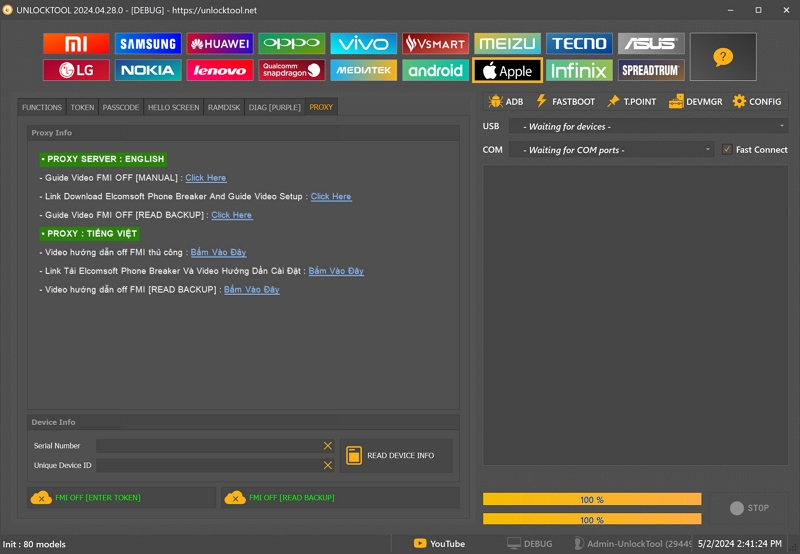
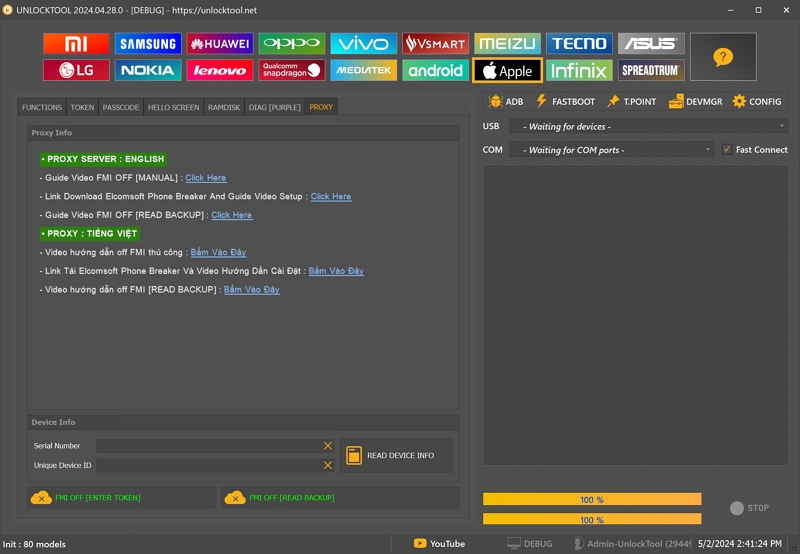
The vendor strip across the top lists the brands the tool handles:
- MediaTek — BROM and Preloader access, DA loading, FRP, format, partition read/write.
- Qualcomm — EDL/9008 Firehose mode, FRP, bootloader operations.
- Samsung — FRP, Odin-mode flashing, KG state.
- Unisoc / Spreadtrum — FRP and firmware operations.
- Huawei, Xiaomi, OPPO, vivo, Vsmart, Meizu, Tecno, Asus, LG, Nokia, Lenovo, Infinix — brand-specific procedures.
- Apple — FMI operations (see the activation-lock note below).
Operation tabs
- Functions — the main operation set for the connected device.
- Token — enter and manage the per-operation tokens that authorise a job.
- Passcode — screen-lock procedures.
- Helio Screen — MediaTek Helio specific screen operations.
- Ramdisk — ramdisk read and patch.
- Diag — diagnostic-port operations.
- Proxy — route the tool's own traffic through the vendor proxy.
FRP module
The FRP tab is where most jobs start, and it offers two distinct routes:
- FRP [ENTER TOKEN] — the licensed path. A server-issued token authorises the erase for that specific device and operation.
- FRP [READ BACKUP] — reads the FRP partition so you hold a copy of the state before and after the job.
The bundled guides cover both methods separately, in English and Vietnamese, including a video walkthrough of the read-backup route.
Device info
- Serial Number and Unique Device ID fields, each with a clear button.
- READ DEVICE INFO pulls both directly from the connected handset.
- Connection state is shown live for USB and COM, with a Fast Connect option.
Workspace rail
- ADB and Fastboot — transport helpers for devices already booted.
- Tpoint — test-point references for forcing BootROM/EDL entry.
- DevMgr — opens Windows Device Manager, useful when the phone enumerates as an unknown port.
- Config — tool settings and proxy configuration.
Model database
The footer shows Init: 80 models — the model list loaded at startup. If that number is low or the list is empty, the tool failed to sync with the vendor and operations will fail in confusing ways. Check that before troubleshooting the phone.
Activation
- Licence is account-based and tied to a username on the vendor site.
- Time-limited licences are available in 3, 6 and 12-month terms.
- Short rentals exist for one-off jobs.
- Reseller credits for workshops doing volume.
- Every operation performs an online check, so the tool needs working internet — and the proxy, if your region is restricted.
Requirements
- Windows 7 / 8 / 10 / 11
- Active UnlockTool account with time remaining
- Correct USB drivers for the target chipset (MTK VCOM, Qualcomm QDLoader, Samsung USB)
- Antivirus exclusion for the install folder — low-level USB and driver access triggers heuristics, so false positives are normal
Note on activation lock
FRP and device-service operations are intended for hardware you own or are refurbishing. The Apple FMI OFF function removes activation lock, which is an anti-theft control — it should only ever be used on a device you own and can prove ownership of.