Overview
XapCut is a CapCut account checker distributed as a compiled, closed-source build written in Rust. It runs a list at speed, tracks throughput live, and separates results by account type rather than dumping everything into "valid" and "invalid".
Unlike a generic combo checker, it reports the details that decide whether a CapCut account is worth keeping — the plan, whether it is on a free trial, and when it expires.
Live run header
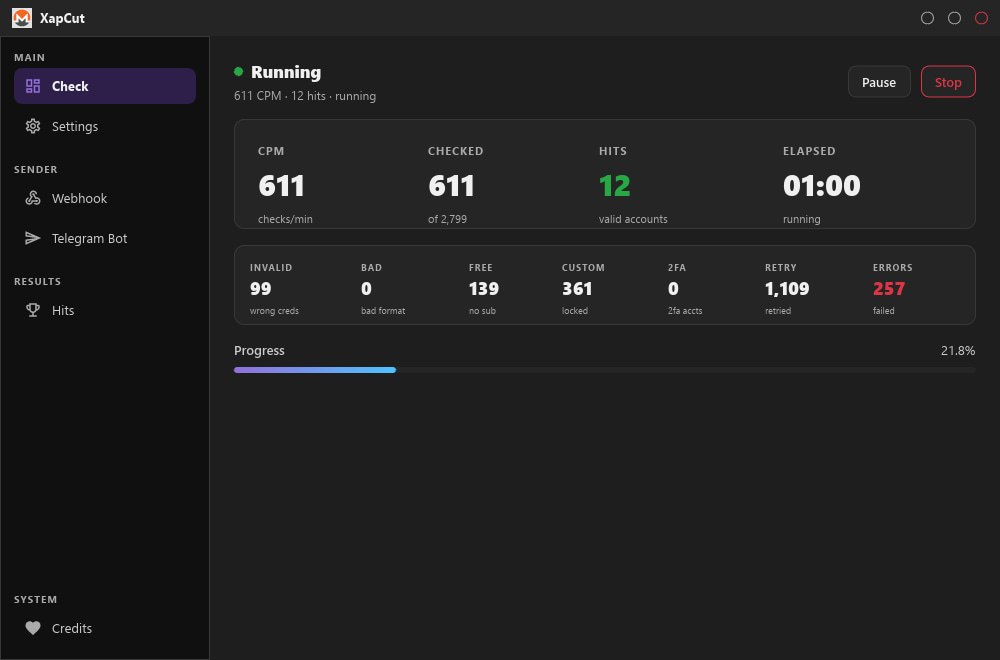
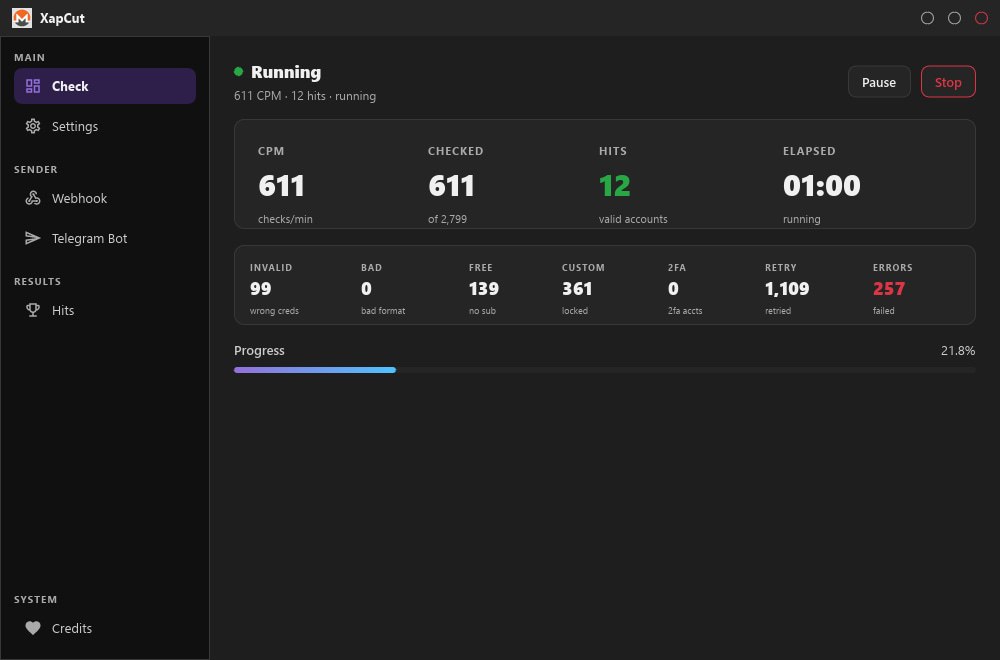
The top bar shows the state of a run at a glance with a running dot indicator while active:
- Status — Running, with current CPM, hit count and elapsed state.
- Pause — halt the run without losing progress.
- Stop — end the session and keep what has been collected.
Primary metrics
- CPM — checks per minute, measured live.
- Checked — progress against the total, shown as
611 of 2,799. - Hits — valid accounts, shown in green.
- Elapsed — running time for the session.
Result breakdown
Every checked account lands in exactly one bucket, so the categories always total the checked count:
- Invalid — wrong credentials.
- Bad — malformed input, rejected before checking.
- Free — valid login with no active subscription.
- Custom — valid account in a state outside the normal free/paid split, typically a locked or restricted account.
- 2FA — account is protected by two-factor authentication.
Two further counters run at attempt level rather than account level, which is why they can exceed the checked total:
- Retry — attempts re-queued after a transient failure.
- Errors — failed attempts, usually proxy or connection problems.
Captured data
Each hit reports the fields that actually matter for CapCut:
- Name and Phone Number
- Verified — whether the account is verified
- 2FA — authentication state
- Country and Members — region and team membership
- Plan — subscription tier
- Is free trial — trial accounts flagged separately
- Expires — subscription end date
Sender and automation
- Webhook — POST hits to an endpoint as they are found.
- Telegram Bot — push hits to a bot or channel, so a long run reports without you watching the screen.
Workspace
- Check — the main run screen with metrics and progress.
- Settings — threads, proxy source and checker behaviour.
- Hits — saved results, kept separate from the live run.
- Credits — licence and usage panel.
Performance note
Throughput depends on the quality of the proxy pool. The retry and error counters exist precisely because residential proxies fail often — a pool with high failure rates will show a large error count and a low effective CPM even though the checker itself is working correctly. Use clean, fast proxies for realistic results.
Requirements
- Windows
- High-quality proxy list — the single biggest factor in throughput and accuracy
- Combination lists in
email:passwordformat - Internet connection