Overview
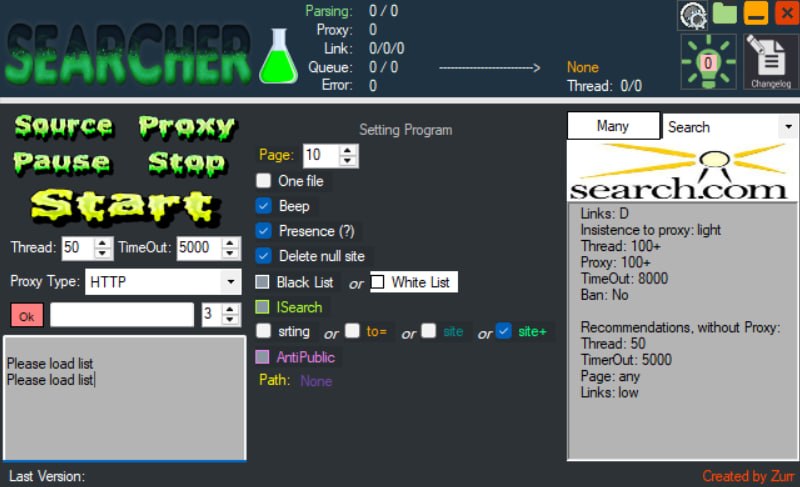
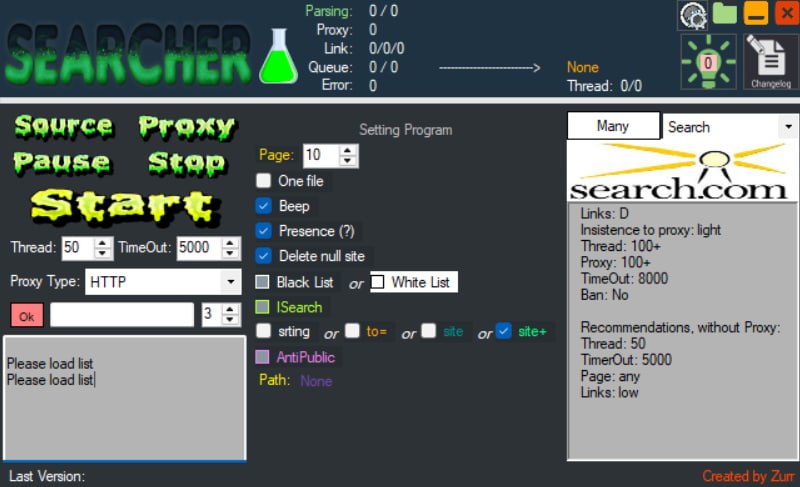
Dork Searcher is a Windows tool that turns search queries into exportable link lists. It queues each page, parses the results, and writes the harvested URLs to disk while rotating through a proxy list so the work continues in parallel instead of one request at a time.
Live status counters
The header strip reports the state of a run at a glance, so you can tell a stalled queue from a dead proxy pool without opening a log:
- Parsing — results processed out of the total queued.
- Link — links collected out of links expected.
- Queue — remaining pages waiting to be fetched.
- Proxy — proxies currently loaded.
- Error — failed requests.
- Thread — active threads out of the configured maximum.
Search control
- Thread and TimeOut settings, adjustable before a run.
- Proxy Type selector (HTTP) with a proxy list loader.
- Page limit to cap how deep each query is crawled.
- One file to write everything into a single output instead of splitting per source.
- Beep to alert you when a run finishes.
- Presence check and Delete null site to drop empty results instead of writing blanks.
Target filtering
- Black List / White List — include or exclude specific domains from the results.
- String field with to=, site and site+ operator toggles for building the query.
- ISearch and AntiPublic modes.
Engine panel
The right-hand panel shows the current engine, here search.com, with a per-engine profile: link count, proxy insistence level, thread ceiling, proxy ceiling, timeout and ban status. It also lists recommended settings for a run without proxies, so you can drop the thread count and raise the timeout before the engine starts throttling you.
Requirements
- Windows desktop application
- A proxy list for anything beyond light crawling — the engine panel warns when a target bans freely
- No runtime or framework installation required